PvP Battles
MCE Online provides a full server-authoritative battle system covering PvP matchmaking, wild/trainer battle validation, spectating, raid co-op, and capture verification. All battle commands are routed through Nakama RPCs so the server is the source of truth.

Both clients send an intent; neither computes the outcome. The server resolves the turn once and tells both the same facts -- which is what stops the faster connection from winning.
Architecture Overview
| Class | File | Responsibility |
|---|---|---|
NetworkedBattleManager | Battle/NetworkedBattleManager.cs | MonoBehaviour bridge between MCE's local BattleManager and the online layer |
ServerBattleAuthority | Battle/BattleServices.cs | Submits all battle actions (move, switch, item, flee) via Nakama RPCs |
BattleMatchmaker | Battle/BattleServices.cs | ELO-based PvP matchmaking using Nakama's matchmaker |
SpectatorService | Battle/BattleServices.cs | Watch live battles in read-only mode |
RaidBattleService | Battle/BattleServices.cs | 5v1 co-op boss battles via realtime matches |
Server-Authoritative Battle Flow
NetworkedBattleManager decides whether to use online validation based on NakamaManager.IsConnected. If offline or forceOffline is set, battles run entirely through the local BattleManager.
Starting a Battle
Wild encounter (server generates the wild monster to prevent IV/shiny manipulation):
string battleId = await networkedBattleManager.StartWildBattleAsync(
    mapId, encounterTableId, playerLevel);
This calls the battle_start_wild RPC. The server returns a BattleStartResponse with battleId and matchId. The client joins the battle match for real-time state updates.
Trainer/NPC battle:
string battleId = await networkedBattleManager.StartTrainerBattleAsync(
    trainerId, mapId);
Calls the battle_start_trainer RPC.
Submitting Actions
All actions go through ServerBattleAuthority via NetworkedBattleManager.SubmitActionAsync():
// Use a move
await networkedBattleManager.SubmitActionAsync(
    BattleActionType.Move, moveIndex: 0, target: 0);

// Switch monster
await networkedBattleManager.SubmitActionAsync(
    BattleActionType.Switch, index: 2);

// Use an item (pass the inventory slot index; the server resolves the item ID)
await networkedBattleManager.SubmitActionAsync(
    BattleActionType.Item, index: itemSlot, target: targetSlot);

// Attempt to flee
await networkedBattleManager.SubmitActionAsync(
    BattleActionType.Flee, index: 0);
Each action type sends a different payload to the battle_submit_action RPC:
| Action | Payload | Server Validates |
|---|---|---|
| Move | battleId, moveIndex, targetSlot, actionType: "move" | Move exists, PP remaining, valid target |
| Switch | battleId, switchTo (slot), actionType: "switch" | Monster alive, not trapped |
| Item | battleId, itemId, targetSlot, actionType: "item" | Item in inventory, valid use |
| Flee | battleId, actionType: "flee" | Flee check (cannot flee from trainer PvP) |
Turn Results
After both players submit actions, the server resolves the turn and returns a TurnResult:
networkedBattleManager.OnTurnProcessed += (TurnResult result) =>
{
    // result.turnNumber, result.playerMoveName, result.enemyMoveName
    // result.playerDamageDealt, result.enemyDamageDealt
    // result.effectiveness, result.statusApplied, result.weatherChange
    // result.playerFainted, result.enemyFainted
};
Battle End
When the battle concludes, OnBattleEnded fires with a BattleResult:
networkedBattleManager.OnBattleEnded += (BattleResult result) =>
{
    // result.playerWon, result.expGained, result.moneyGained
    // result.itemsGained, result.evGained, result.enemyCaught
    // result.eloChange (PvP only)
};
The match is automatically left and state cleaned up via EndBattleAsync().
Online Capture System
Capture attempts are server-validated to prevent catch rate manipulation:
CaptureResult result = await networkedBattleManager.AttemptCaptureAsync("pokeball");
// result.Success -- whether the capture succeeded
// result.ShakeCount -- number of shakes (0-3)
// result.IsCriticalCapture -- whether it was a critical capture
The battle_attempt_capture RPC receives the battleId and ballId, and the server computes the catch rate, shake count, and critical capture chance.
ELO-Based Matchmaking
BattleMatchmaker uses Nakama's built-in matchmaker with ELO-based filtering.
Starting a Search
await NakamaManager.Instance.Matchmaker.StartSearchAsync(
    eloRating: 1200, tier: "any");
The matchmaker query finds opponents within +/- 200 ELO:
+properties.elo:>=1000 +properties.elo:<=1400
Numeric properties include the player's elo, and string properties include the tier.
The matchmaker creates a 2-player match (minCount: 2, maxCount: 2).
Match Found
When a match is found, ReceivedMatchmakerMatched fires on the socket, which triggers:
NakamaManager.Instance.Matchmaker.OnMatchFound += (matchId, opponent) =>
{
    // opponent.UserId, opponent.DisplayName
    // matchId -- the battle match to join
};
Authoritative PvP Match (pvp_match_create)
Matchmaking finds an opponent; the authoritative PvP battle then runs in a
shared server-owned match. pvp_match_create (RpcIds.PvpMatchCreate, handled by
rpcPvpMatchCreate in src/battle/pvp-engine.ts) pairs the two players:
[Serializable]
public class PvpMatchCreateRequest { public string opponentUserId; }

[Serializable]
public class PvpMatchCreateResponse { public bool success; public string matchId; public string error; }
The caller passes opponentUserId; the server creates the shared, server-authoritative
pvp_battle match and returns its matchId to join. The opponent is pushed a
pvp_match_ready notification (code 111) carrying the same id, so both clients
converge on one authoritative match. Both rosters must be seeded server-side or
the RPC hard-rejects — a client cannot forge a team into a ranked match.
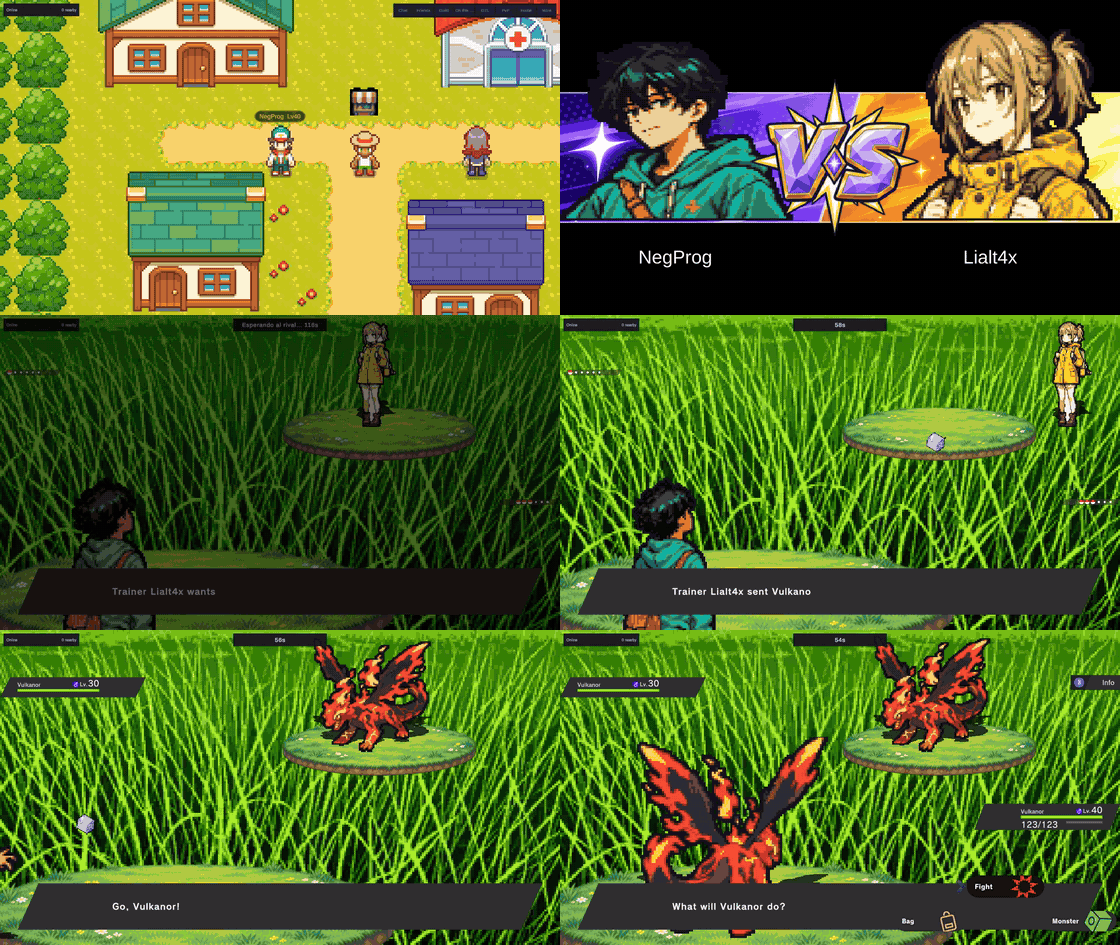
How a PvP Battle Looks
- The VS. A PvP opens with the animated VS screen. The server's match start carries each seat's appearance, and both sides of the VS show the VS portrait of their appearance (
CharacterType.VersusPortrait), with the name each player has online. - The rival. The rival stands in the battle with its own appearance, not the local player's.
- The music. A PvP plays the online config's Pvp Battle Music (
BattlePvpby default; see Battle Music). - The turn. The turn carries who struck first; each move plays its animation before its target's HP changes, and a monster that takes a hit blinks.
- Switching. Picking a monster to switch in sends the server's slot for that monster, so the server sends out the one the player picked even when the client's party is in another order.
Search Status and Cancellation
bool searching = NakamaManager.Instance.Matchmaker.IsSearching;
float duration = NakamaManager.Instance.Matchmaker.SearchDuration;

await NakamaManager.Instance.Matchmaker.CancelSearchAsync();
OnMatchCancelled fires after successful cancellation. The matchmaking timeout is configured via OnlineConfig.MatchmakingTimeout (default: 60 seconds).
Spectator Mode
SpectatorService lets players watch live battles in read-only mode.
Listing Live Battles
List<SpectableBattle> battles =
    await NakamaManager.Instance.Spectator.GetLiveBattlesAsync();

foreach (var battle in battles)
{
    // battle.BattleId, battle.Player1Name, battle.Player2Name
    // battle.SpectatorCount, battle.Duration
}
This calls the get_live_battles RPC.
Watching a Battle
bool joined = await NakamaManager.Instance.Spectator.SpectateAsync(battleMatchId);
// Receive battle state updates via OnBattleStateUpdate

await NakamaManager.Instance.Spectator.StopSpectatingAsync();
Spectator mode is controlled by OnlineConfig.EnableSpectator (default: true). Maximum spectators per battle: MaxSpectatorsPerBattle (default: 20).
Raid Battles (5v1 Co-op)
RaidBattleService provides cooperative boss battles where up to 5 players fight a single powerful monster.
Available Raids
List<RaidBossInfo> raids =
    await NakamaManager.Instance.Raids.GetAvailableRaidsAsync();

foreach (var raid in raids)
{
    // raid.BossId, raid.BossName, raid.Difficulty (Normal/Hard/Legendary/Mythic)
    // raid.CurrentParticipants, raid.MaxParticipants, raid.RecommendedLevel
}
Creating a Raid Lobby
string raidMatchId = await NakamaManager.Instance.Raids.CreateRaidLobbyAsync(
    bossId: "raid_boss_legendary_dragon",
    difficulty: RaidDifficulty.Legendary);
This creates a Nakama match and registers it on the server via the raid_create RPC with the matchId, bossId, difficulty, and maxParticipants (from OnlineConfig.RaidMaxParticipants, default: 5).
Joining and Playing
bool joined = await NakamaManager.Instance.Raids.JoinRaidAsync(raidMatchId);

// Submit actions during the raid
await NakamaManager.Instance.Raids.SubmitRaidActionAsync(raidId, moveIndex);
Raid actions use match state op code 200.
Raid Events
Raids.OnRaidFound += (raidId) => { };
Raids.OnPlayerJoinedRaid += (userId, count) => { };
Raids.OnRaidStarted += (raidId) => { };
Raids.OnRaidCompleted += (raidId, success) => { };
Raid battles are controlled by OnlineConfig.EnableRaidBattles (default: true).
Battle Tuning
Timeouts and caps. These are not the game's difficulty — that is a world rule the operator seeds server-side, and it lives in World Options.
| Config Field | Default | Description |
|---|---|---|
MatchmakingTimeout | 60s | PvP search timeout |
PvPTurnTimeout | 45s | Time per turn in PvP |
MaxSpectatorsPerBattle | 20 | Spectator cap |
RaidMaxParticipants | 5 | Max players in a raid |
EnableSpectator | true | Toggle spectator mode |
EnableRaidBattles | true | Toggle raid battles |
Anti-Cheat in Battle Context
When OnlineConfig.EnableServerAuthority is true, ALL battle outcomes are determined server-side:
- Wild encounters: The server generates the wild monster (species, level, IVs, shininess) to prevent client-side manipulation.
- Capture attempts: Catch rate is computed server-side.
- EXP/money/items: Rewards in
BattleResultcome from the server and are applied only after validation. - ELO changes: Ranking adjustments are computed and applied by the server.
The OnlineCommandBridge ensures that any items or money gained from battles are validated via the mce_give_item and mce_give_money RPCs.