GM Mode
GM Mode is how you test your game against your live server.
Once the server is authoritative, the tricks you used offline stop working. You cannot hand yourself a level‑40 monster by editing a save file, because the save file is no longer where the truth lives — the server is. Set the level locally and the next roster sync overwrites it, or worse, it does not, and you spend an afternoon chasing a bug that only exists on your machine.
That is the whole reason this exists. A debug tool that writes to the local save while the server is authoritative is not a tool: it is a generator of phantom bugs. So every GM action is a server RPC, resolved by the server, persisted by the server, and visible to every client that asks.
GM Mode is for the person operating the server — you, during development, and whoever runs your game after launch. It is not a player feature, and it is not a cheat menu you ship enabled. See Locking it down.
Two ways in
The same eight RPCs are reachable from two places, because two different jobs need them.
| In‑game panel | Hub GM tab | |
|---|---|---|
| Where | Running game, F9 | Tools → MCE → OpenMon Hub → GM |
| For | Testing while you play | Operating without launching the game |
| Needs | A logged‑in online session | Its own email/password login |
The in‑game panel (F9)
The hotkey installs itself — there is nothing to drag into a scene, and that is deliberate: an operator tool has to work in any scene, including the ones you create after buying the engine, and a scene wired by hand is forgotten in the next one.
It did not always. GmModeHotkey shipped as a component with zero references — no
prefab, no scene, no asset named it — so nothing ever instantiated it and F9 could not
work in any game. Found by driving, not by reading: pressing F9 in a live online session,
signed in as a real game master, sent no gamemaster_status to the server at all.
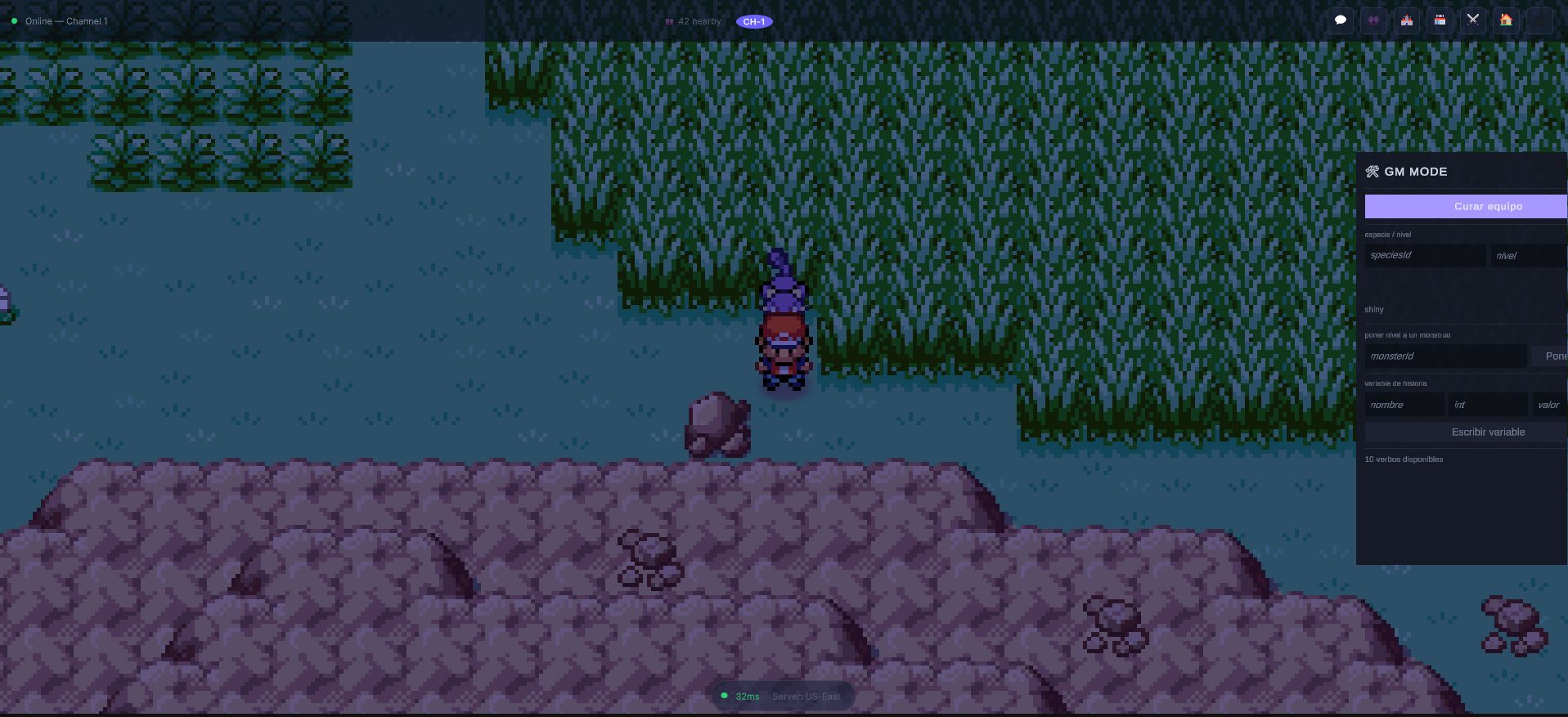
That is the panel over a live online world, opened with F9 on an account the server
recognises. The line at the bottom — "10 verbos disponibles" — is not a label the
client wrote: it is the server's own answer to gamemaster_status, which is why an
account without the permission sees the panel refuse to open rather than open empty.
F9 is the default because it sits outside the range MCE uses to play — the
movement keys, Z/X, and the menu bindings are all untouched, so the panel
cannot swallow an input the game needed. The binding lives in GmModeHotkey.cs
and is a plain Key field, so you can move it.
The panel only appears for an account the server considers a game master. It
asks — it does not assume. On open it calls gamemaster_status, and the answer
is about the caller: there is no way to ask "is that account a GM", which
is why the RPC cannot be used to enumerate who has power on your server.
The Hub GM tab
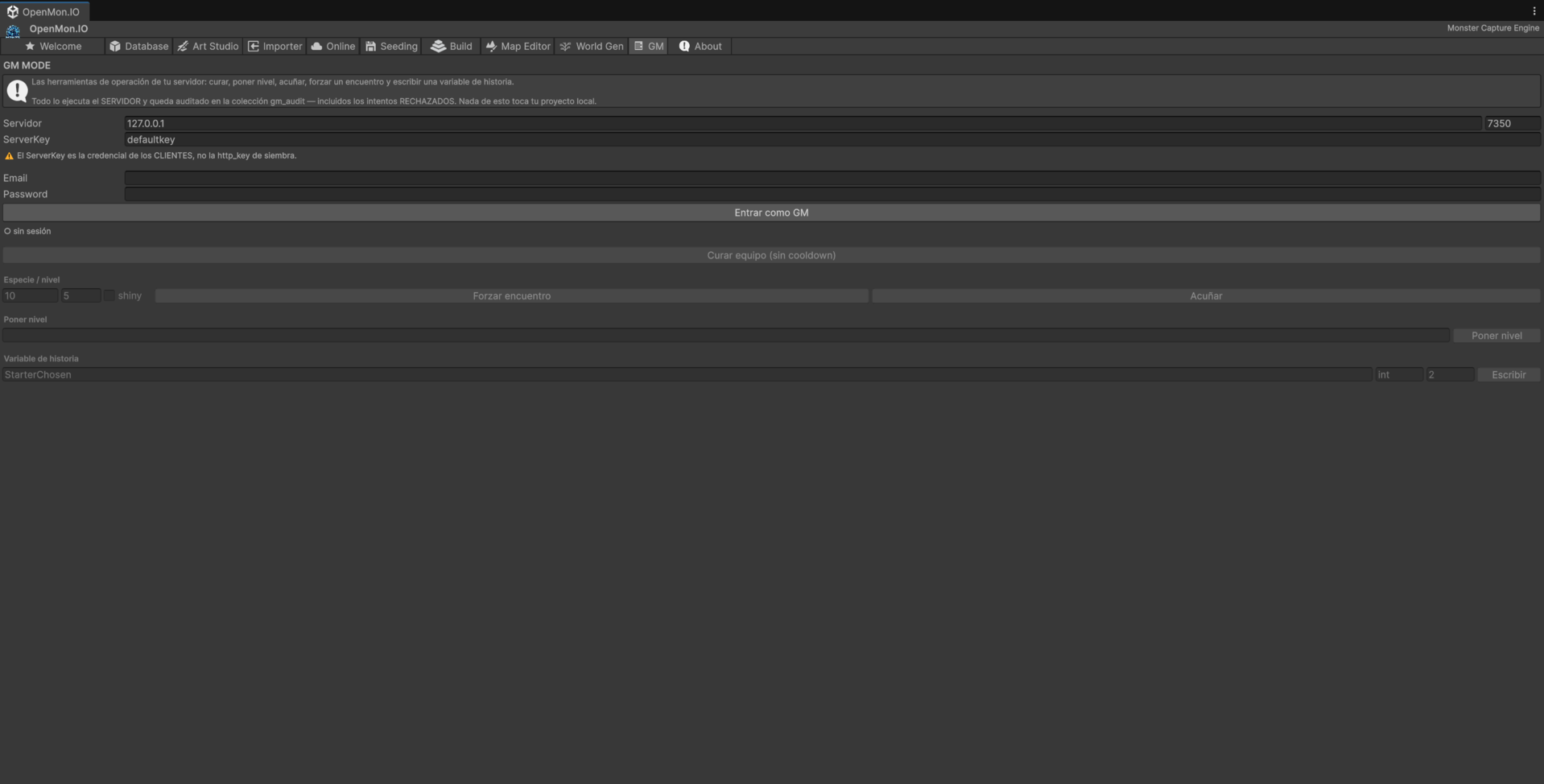
The Hub tab signs in with an email and password, exactly like a player, and gets a real session token back. That is a deliberate choice and it is worth explaining, because the rest of the Hub does not work this way.
Every other Hub panel that talks to the server — seeding especially — speaks
server‑to‑server with the Nakama runtime http_key. That key has no user
attached to it. And all seven acting verbs require ctx.userId, because every
one of them writes a row naming who did it.
We could have added http_key variants of the verbs. We refused, and the reason
is one sentence: the audit row would say "the http_key did it", and the log
would lose its subject — which is the only thing anyone ever asks an admin log.
http_key is not a game masterThey are two credentials with two meanings. Holding the seeding key lets you write to storage server‑to‑server. It does not make you a game master, and it never grants a GM verb. Do not conflate them, and do not put either one in your repository.
The tab also distinguishes four states rather than collapsing them into one failure. "You are not signed in", "you signed in and you are not a GM", "you are a GM but this server has the kill switch on", and "ready" send you to four different places. A single "could not connect" would send you to check credentials when what you actually need is a grant — or to seed a permission you already have when what you need is to talk to whoever runs the server.
The tab does not remember your password between editor sessions. Host, port, server key and email persist; the password does not.
The eight verbs
One asks a question. Seven act.
| RPC | What it does |
|---|---|
gamemaster_status | Am I a game master? Is GM Mode enabled here? Which verbs exist? |
gamemaster_mint_monster | Create a monster of a given species, on the server, with a server‑assigned id |
gamemaster_set_level | Move a monster's level |
gamemaster_set_hp | Set current HP — including down to zero, to reach the faint paths |
gamemaster_heal_party | Full‑restore the party |
gamemaster_force_encounter | Force the next wild encounter |
gamemaster_set_dex | Mark a species seen or caught |
gamemaster_set_variable | Write a game variable |
gamemaster_mint_monster is worth a note. It creates the monster on the
server, and the server assigns the id. There is no client path that can mint
one — the uplink can update the seven fields a player changes by playing, and
that is all it can do. If you need a monster to exist, this is the only door.
Why this beats replaying content
gamemaster_set_level exists because verifying an evolution animation used to
cost 126 battles. The feature it replaced was not a shortcut around testing;
it was the difference between a test that gets run and a test that does not.
Locking it down
Three independent things must all be true before a verb executes. Any one of them is enough to stop it.
1. The game master table. An account is a GM only if it is in that table. The table starts empty, and empty means nobody — not "everyone", not "the first account", not "whoever holds a key". A fresh server has no game masters at all.
2. The kill switch. Setting the environment variable
MCE_GM_MODE_DISABLED=true turns off every verb without touching the table. Use
it on a production node: the grants stay exactly as they are, and nothing can be
invoked. Turning it back off restores what you already had, so you never have to
rebuild the table from memory in an incident.
3. The per‑verb gate. requireGameMasterVerb runs on every call, including
gamemaster_status. A rejected call is still recorded.
Two audit trails, on purpose
Every GM action writes two records, and they exist for two different readers.
gm_audit is the operator's log. It is system‑owned, it names the game
master, the verb and the target, and it is written for every call — including the
ones that were refused. A rejection is exactly the event an admin log is for.
The second record goes under the target player's own account, readable by that player. This is the half that is easy to skip and the one that matters ethically: a player can always find out that someone with power touched their data. The state "they were touched and never told" is not something this system can represent — the player‑visible row travels in the same storage write as the effect itself, so there is no window in which one landed and the other did not.
Setting it up
- Get the server running — see Setup.
- Create the account you want to operate with (play the game once, or register).
- Grant it game master in the
game_masterstable. - Open the Hub GM tab, sign in, and confirm the status line says you are a GM.
- In‑game, press F9.
If the panel does not appear, the status call is the thing to read: it tells you which of the three gates stopped you.
Before you ship
- Set
MCE_GM_MODE_DISABLED=trueon any node players can reach, unless you deliberately want live GM tooling in production. - Keep the game master table small and audited. Every account in it can write to any player's data.
- Read
gm_auditafter incidents. It is written for exactly that moment.