Species Seeding
The server resolves battles itself. It applies the damage formula, rolls the random damage variance, decides critical hits, and rolls the IVs, nature, gender and shininess of every captured monster. To do any of that it needs the base stats, types, catch rate and gender ratio of each of your species.
It does not get them from the client. A client that could send its own species stats could send whatever it liked, so the server refuses to read them from a battle payload. It reads them from its own storage — which starts empty.
What happens if you skip this
Nothing visible. That is the problem worth understanding before anything else.
An unseeded server does not error, warn, or refuse to start a battle. It walks down a fallback chain:
species_datastorage — the seeded values, your real data.SPECIES_FALLBACK_TABLE— six built-in species, hardcoded in the server module for its own tests.DEFAULT_SPECIES— one generic stat line applied to everything else.
So an unseeded server happily runs battles in which every one of your creatures
has identical placeholder stats. Captures roll their gender against a flat 50/50
regardless of the species. Type effectiveness resolves against NORMAL. Nobody
gets an error message, because from the server's point of view nothing went
wrong: it asked storage, storage had nothing, it used a default.
Seeding is what makes the authoritative server authoritative over your game rather than over a placeholder.
The two halves, and why they are separate
Seeding is deliberately split into an export step inside Unity and a seed step outside it.
The seed RPC (mce_species_seed) is server-to-server only — it rejects any
call that carries a user session, and requires the Nakama runtime HTTP key. That
key is an administrator credential: whoever holds it can write to any player's
storage. It must never be committed, never be embedded in a build, and never be
typed into a ScriptableObject.
So Unity, which cannot hold that key safely, only writes a file. A script run from your terminal, which reads the key from the environment, posts it.
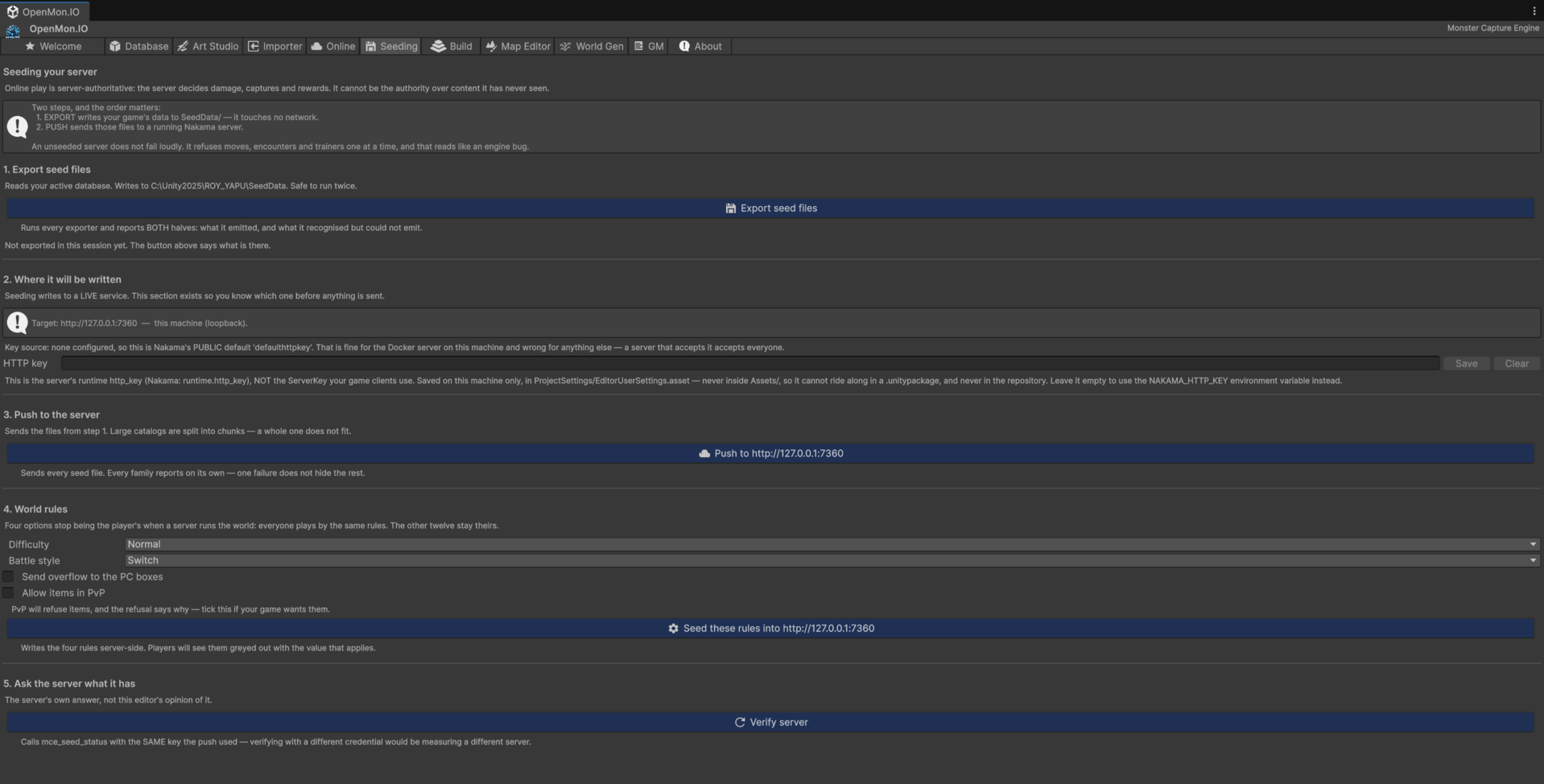
The Hub's Seeding tab is the buyer-facing path for everything below: it exports the files and reports what the server currently holds.
Step 1 — Export from Unity
Menu: Tools → MCE → Online → Export Species Seed JSON
This reads the active monster database and writes two files to SeedData/
in your project root — deliberately outside Assets/, so Unity never imports
them and they are covered by .gitignore:
| File | Contents |
|---|---|
species-seed.json | The payload to send |
species-seed.report.txt | Every entry skipped and every value the server will replace |
Read the report. The server clamps every stat into 1–255 and substitutes its own default for anything outside that range, silently. If one of your species has a base stat of 0, that value will be replaced on the server and the report is the only place in the entire pipeline where you will ever see it mentioned.
Entries are skipped rather than exported when they have no dex number, share a dex number with another entry, have no forms, or have no first type. Every one of those is listed by name in the report.
Only the base form of each species is exported. The server stores species data under the dex number alone, so a second row for an alternate form would overwrite the first.
Step 2 — Seed the server
From Assets/OpenMon/Online/Server~/nakama/:
# bash
export NAKAMA_HTTP_KEY=your-runtime-http-key
npm run seed:species
# PowerShell
$env:NAKAMA_HTTP_KEY="your-runtime-http-key"
npm run seed:species
The script validates the file before sending anything, and refuses to seed when it finds a value the server would silently replace. It then posts the species in chunks, because the RPC turns each request into a single storage write and a full dex in one write is where Nakama starts refusing.
| Variable | Default | Meaning |
|---|---|---|
NAKAMA_HTTP_KEY | — | Required. The server's runtime http_key. |
NAKAMA_URL | http://127.0.0.1:7360 | Server base URL. |
SEED_FILE | SeedData/species-seed.json | Alternative input path. |
SEED_CHUNK_SIZE | 100 | Species per request. |
To validate the export without sending anything:
npm run seed:species:check
Seeding is idempotent. Each species is written under its own key, so re-running after adding creatures updates the changed rows and leaves the rest alone. Run it again whenever your database changes — that is the normal workflow, not a recovery step.
Step 3 — Verify
Open the OpenMon Hub. The content tab reports two things, and they answer different questions.
The first is local and instant. It compares the export on disk against your active database and needs no network at all. This is what catches the failure that actually happens in practice: not a bad seed, but an export written weeks ago followed by forty new creatures. A live server check cannot see that, since the server has no idea what your project contains.
The second is the Verify server button, and only it touches the network. It distinguishes three outcomes, and the distinction matters:
| Result | Meaning |
|---|---|
| Seeded | The collection holds species rows, and it says how many. |
| Empty | The server answered. Its collection is empty. |
| Could not ask | Offline, wrong host, wrong server key. This says nothing about the data. |
"Not seeded" and "no answer" are different facts. A status light that merges them is worse than no status light, because it reports a data problem when the real problem is a network one.
You can also verify directly against the database:
select count(*) from storage where collection = 'species_data';
Seeded rows are written under Nakama's system user with public read and server-only write permission, so clients can read species data but no client can ever write it.
When to re-seed
- After adding, removing or renaming species
- After changing base stats, types, catch rate or gender ratio
- After importing a project with the Essentials importer
- On every fresh server deployment — a new database starts empty