Secret Bases & Player Gyms
MCE ships a single-player buildable-interior slice: the player can enter an instanced room they own, decorate it from a catalog, run an endless Battle Tower, rematch beaten gym leaders, and even stand up their own custom gym with a leader team and a custom badge. Everything here is local — it rides the normal save with no schema migration.
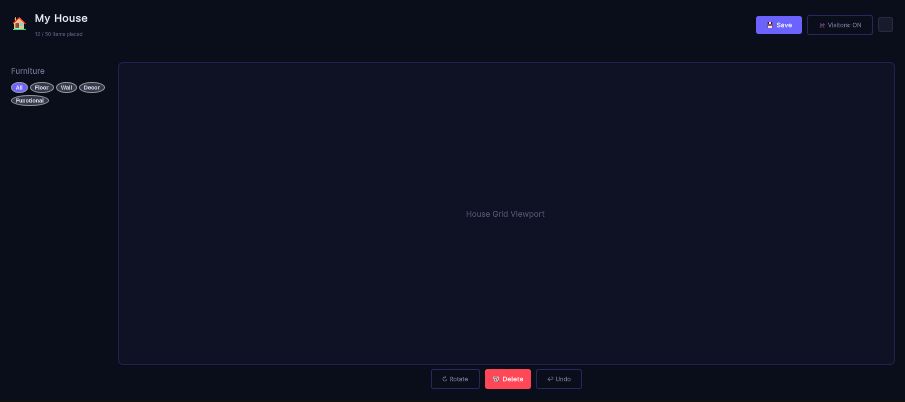
The same editor backs secret bases. The furniture filters and the placement counter are live; the grid viewport is still a placeholder, so treat the layout half as unfinished.
Visiting other players' bases, syncing furniture over the wire, and server-authoritative housing are the online layer's job. This page covers only the single-player systems. For the networked, visitable version see the Player Housing guide.
All four features are reached from the in-game pause menu (GameMenuScreen, cases 8–11) — see the Menu System guide for how the entries are wired and gated.
Overview
| Feature | Pause-menu entry | Persistent home (in the save) |
|---|---|---|
| My Base (decorate) | Mi Base (case 10) | GlobalGameData.SecretBase |
| My Gym (custom gym) | Mi Gimnasio (case 11) | GlobalGameData.PlayerGym |
| Battle Tower (endless) | Torre de Batalla (case 9) | ephemeral — not saved |
| Gym battle / rematch | Gimnasio (case 8) | GymDefinition asset (authored) |
My Base (Secret Base)
Player-facing flow
Selecting Mi Base branches on where the player is standing (GameMenuScreen.EnterOrDecorateSecretBase):
- In the overworld → the current tile is stashed as the return location and the player is teleported into the instanced interior scene via the same
PlayerTeleporterwarps use. - Already inside the interior → the in-interior decorate palette opens (
SecretBaseDecorateController.Open).
The interior is a single instanced room. The player's saved decor is drawn on load and re-synced whenever it changes.
Decorating
SecretBaseDecorateController is a menu-driven place/remove flow (it reuses DialogManager.ShowChoiceMenu — no new UI framework). Decor is placed on the tile the player faces (the same facing-tile math the "Base Kit" item uses):
- Place — pick a decor from the catalog palette, then it is placed on the faced tile.
- Remove — whatever decor covers the faced tile is removed (the base's reserved world anchor is protected and can never be deleted this way).
All legality (bounds + overlap) lives in the pure SecretBasePlacement core — the controller only gathers the player's choice and calls the manager.
The persistence model
A Secret Base is a plain, JsonUtility-serializable POCO that rides GlobalGameData.sav with no save-format migration (the same precedent as FollowerData):
[Serializable]
public class PlacedDecor
{
    public string DecorId;        // opaque id, resolved against a DecorCatalog
    public Vector3Int Tile;       // footprint origin, in real grid coords
    public int FootprintWidth = 1;
    public int FootprintHeight = 1;
    public int Rotation;
    public string CustomData;     // opaque per-placement data (variant/colour)
}

[Serializable]
public class SecretBaseData
{
    public List<PlacedDecor> PlacedDecor = new();
}
Under the single-base model, the base's overworld anchor cell is persisted as a reserved-id PlacedDecor (SecretBaseManager.BaseAnchorDecorId) inside that same list, so the anchor rides the existing persistence with zero new save fields.
The runtime seam
SecretBaseManager is a plain POCO bridge between a world/menu interaction and the verified SecretBasePlacement core plus the save. It owns none of the placement rules — it delegates every legality decision to the pure core and only adds two responsibilities the core deliberately leaves out: the walkability predicate and persistence into GlobalGameData.SecretBase.
| Member | Purpose |
|---|---|
TryPlaceBase(Vector3Int cell, SecretBaseData data) | Anchor a base at an overworld cell (validates + persists) |
RemoveBase(Vector3Int cell) | Clear the single-base save field |
AddDecor(string decorId, Vector3Int tile, int rotation = 0) | Resolve against Catalog, validate against InteriorBounds, append to the save |
RemoveDecorAt(Vector3Int tile) | Remove the decor covering a tile (refuses the anchor) |
MoveDecor(Vector3Int from, Vector3Int to) | Remove-then-re-place; reverts on an invalid target |
InteriorBounds (RectInt) | The only placeability rule the interior uses |
Catalog (DecorCatalog) | The id → prefab/sprite/footprint resolver |
OnBasePlaced / OnBaseRemoved / OnDecorChanged | Events the world/interior visuals listen to |
Setting it up as a developer
The systems are code-complete; wiring the scenes and assets is the dev's job. Nothing here is invented — every type below is a real class under Assets/OpenMon/Core/Runtime/World/.
1. Author a decor catalog
Create a DecorCatalog asset (menu MCE ▸ World ▸ Decor Catalog). Each DecorEntry is a plain serializable holder:
[Serializable]
public class DecorEntry
{
    public string DecorId;             // stable, opaque, unique in the catalog
    public string DisplayNameLocKey;   // localization key shown in the palette
    public GameObject Prefab;          // spawned when the interior is populated
    public Sprite Icon;                // palette/menu icon
    public int FootprintWidth = 1;
    public int FootprintHeight = 1;
}
The catalog is a sandbox resolver: every entry is always available — there are no unlock flags, economy, or gating in this slice. Lookup is O(1) via TryGet(decorId, out entry).
2. Build the interior scene
Add a SecretBaseInteriorLoader to the interior scene. It is the single MonoBehaviour that owns the room: it constructs a runtime SecretBaseManager bound to the live GlobalGameData, hands it the interior seams (the DecorCatalog and the InteriorBounds rectangle), publishes it into SecretBaseRegistry and SecretBaseInteriorSession, then instantiates one prefab per PlacedDecor and re-syncs on OnDecorChanged.
Serialized fields to assign:
| Field | Meaning |
|---|---|
catalog | The DecorCatalog handed to the manager |
interiorBounds | Room rectangle, in this scene's tile coords (default 8×8) |
grid | Scene Grid for tile→world mapping (falls back to identity coords) |
decorContainer | Parent for instantiated decor (defaults to the loader's transform) |
arrivalMarker | Authoring marker for where the player arrives |
The loader implements IPlayerDataReceiver because PlayerDataInstaller binds GlobalGameData with .WhenInjectedInto<IPlayerDataReceiver>(). Without the marker the [Inject] is silently skipped and the interior renders empty at runtime even though every offline test passes.
3. Wire the pause-menu entry
On the GameMenu prefab (GameMenuScreen), assign:
secretBaseInteriorScene— theSceneInfoAssetof the interior template.secretBaseInteriorSpawn— the tile the player arrives at (should sit insideinteriorBounds).
Until secretBaseInteriorScene is assigned, the Mi Base enter step is a safe no-op. The return tile is captured on GlobalGameData.SecretBaseReturn and round-trips through the save, so the interior's dynamic exit (ExitSecretBaseInterior) brings the player back exactly where they left.
4. (Optional) Show the base in the overworld
SecretBaseSpawner turns OnBasePlaced / OnBaseRemoved into a visible prefab. Bind the runtime manager with SetManager(...) (which also registers it into SecretBaseRegistry so the "Base Kit" item can resolve it), and author baseVisualPrefab. Under the single-base model, a new placement despawns any previous base visual first. The spawn/despawn/grid-mapping are injectable seams (SetSpawnFactory, SetDespawner, SetCellToWorld) so the flow is edit-mode testable without a live scene.
My Gym (player-owned gym)
Mi Gimnasio (case 11) is the gym variant of the base flow. It reuses the exact decor engine — a SecretBaseData Room validated by the same pure SecretBasePlacement core — and adds the gym-specific data a base has no notion of.
First-entry provisioning
On the first overworld entry (GameMenuScreen.EnsureGymEstablished), the gym is established with sane defaults:
- The gym is marked
Established. - The leader team defaults to the player's current party (each occupied roster slot).
- A placeholder badge id is assigned so a challenger has something to earn.
This is idempotent: an already-established gym is left as-is except that a still-empty leader team is defaulted.
The persistent model
[Serializable]
public class PlayerGymData
{
    public bool Established;
    public string GymName = "";
    public SecretBaseData Room = new();        // reuses the F2 decor engine wholesale
    public List<int> LeaderRosterSlots = new();// indices into the player's own Roster
    public string BadgeId = "";                // custom badge a challenger earns
    public string BadgeDisplayName = "";
    public string IntroDialogKey = "";
    public string VictoryDialogKey = "";
}
Everything lands in the existing save fields (GlobalGameData.PlayerGym / GlobalGameData.EarnedGymBadges), so it round-trips with no migration.
The runtime seam
GymManager is to the gym what SecretBaseManager is to the base — a plain POCO that delegates all decor legality to the shared core and adds the gym-only concerns:
| Member | Purpose |
|---|---|
EstablishGym(string gymName = null) | Create the gym (idempotent) |
HasGym() | Has the player created their gym? |
SetLeaderSlots(IEnumerable<int> slots, int rosterSize) | Replace the leader team (sanitized, deduped, in-range) |
HasLeaderTeam(int rosterSize) | Is at least one leader slot valid? |
SetBadge(string badgeId, string badgeDisplayName = null) | Set the custom badge challengers earn |
SetDialogs(string introKey, string victoryKey) | Set the leader battle dialog keys |
AwardEarnedBadge(string badgeId) | Award the badge to a challenger once |
CanChallenge(string ownerId, string challengerId) | Pure rule: an owner can never earn their own gym's badge |
AddDecor / RemoveDecorAt / MoveDecor | Same decor API as the base, over the gym Room |
Building the gym interior scene mirrors the base exactly: add a GymInteriorLoader (also an IPlayerDataReceiver), assign its catalog and interiorBounds, and set gymInteriorScene + gymInteriorSpawn on the GameMenu prefab. The gym interior reuses the base interior's dynamic exit, so it stashes the return location the same way (the two interiors are never entered simultaneously).
The frozen leader snapshot a remote visitor would challenge (so the owner can be offline) is the server slice — the local model references the leader team by roster slot, which is all the client-side custom gym needs.
Gym battles & rematches
Gimnasio (case 8) launches a practice/rematch battle against the menu's configured gym leader. It sources its launch context exactly like a normal overworld trainer fight (SingleTrainerFight) and re-enters the overworld grid on a win.
A gym is authored as a GymDefinition ScriptableObject (menu MCE ▸ Gyms ▸ Gym Definition) that aggregates the primitives a gym is composed of:
| Field | Purpose |
|---|---|
LeaderNameLocalizationKey | Leader display-name loc key |
LeaderRoster | The leader's battle roster (needs ≥ 1 non-null monster) |
LeaderCharacter (CharacterData) | Required — the battle dereferences it for the trainer front sprite |
LeaderBag (Bag) | Required — the items module clones the enemy trainer's bag |
BadgeReward (Badge) | Awarded when the leader is defeated |
TrainerRosters | Optional sub-trainers cleared before the leader |
IntroDialogKey / DefeatDialogKey / PostBattleDialogKey | Dialog loc keys through the battle flow |
LeaderCommandGraph | Generated leader battle flow (from Gym Builder) |
GymOrder | Optional ordering hint (1 = first gym) |
Assign the GymDefinition to GameMenuScreen.menuGymDefinition in the menu prefab. When the slot (or its LeaderRoster) is unassigned, the entry is a safe no-op.
Battle Tower
Torre de Batalla (case 9) spawns a throwaway, scene-less Battle Tower on demand via EphemeralTowerLauncher.Launch(diContainer, playerCharacter). It stands up a TowerController + TowerRewardPayout on a fresh GameObject, runs the endless loop, and tears the GameObject down the moment the run reaches any terminal state (loss, abort, or an illegal-team rejection).
Key properties:
- Ephemeral — it deliberately does not mirror run-state into
GlobalGameData.TowerRun, so a menu-launched run never leaks into a save. It lives and dies with its GameObject. - Real rewards — money is still paid: the payout is bound straight to the player's real wallet (
player.PlayerBag), matching the authoredStartTowerRunpath. - Endless single-battle —
TowerControllerre-launches the next battle from each battle's own end-callback and continues until a loss, firing set-completion events at each set boundary.
Opponents are anonymous — generated from the player's roster references, they carry no CharacterData or Bag. The battle system was hardened to tolerate this (see Battle System ▸ anonymous trainers).
Out-of-the-box balance
TowerBalanceDefaults supplies a playable fallback rule-set and reward curve so a fresh tower is not empty. A designer overrides these on TowerController (serialized) or via SetRules:
- Rule-set — level cap 50, auto-level to cap on, team size 3, single battles, Species Clause on (no duplicates), legendaries banned, set length 7.
- Reward curve (streak → money) —
0 → 500,7 → 1500,21 → 5000,49 → 15000.
The default numbers are best-judgment placeholders — tune them against your shop price table before shipping.